

This week, I typed one bundled request into my terminal: review my website and find ways to improve SEO, then check my fantasy football leagues for who to start and who to pick up off waivers this week.
My LilyOS master agent split that into two tasks and handed each one to the agent that runs that project. The website agent already knew how my site is built and deployed. The fantasy football agent already knew my league details, rosters, and the scoring rules.
What came back: the website agent found five pages Google had discovered but never indexed, and its audit traced them to missing internal links, since nothing else on my site linked to them. Each finding came with a fix and a way to check it. The fantasy football agent caught a starter in my lineup whose team was on bye, and gave me my waiver bids for the week.
I didn’t have to explain or give my site details, my league info, or my preferences to different sessions or go to different project chats.
That’s because I built my own operating system that distills projects into code and lets agents do my work.
What turning knowledge work into code means
A project becomes records. A folder structure and what goes in it: a short brief on what the project is, its current status, the decisions made so far, files and context for the project, and what the agent should read first.
A request becomes a task. A specific record with an objective, criteria for when it’s done, the files it needs for the right context, and what it’s allowed to do.
Tasks go through stages. My tasks in Claude Code move through specific stages (ready, working, review, blocked, done) through scripts. Agents sometimes forget or skip a skill, so these rules are enforced in code, and a task doesn’t count as done until it has been through the review it needs. For example, a script won’t close a task until a reviewer has passed its latest version.
I had to shorten the QA steps because at first they took forever, with multiple QAs and panes that I was having trouble managing. (A pane is one of the side-by-side windows in my terminal, each running its own agent session.) For smaller and more immediate tasks, I cut down the QA, so now the independent review is for things like coding and drafting items for external audiences.
My goal is the best output, balanced by efficiency: something that sounds like me, with decisions and judgment I’d make, that I have to edit less, with factual and insightful information. A lot of this is enforced with scripts too. When an agent saves a draft for my Substack or website, a process checks it against my voice rules and sends it back if fixes are needed.
What it looks like in the terminal
We can walk through an example. Let’s take SEO for my website, lilyluo.ai.
I tell LilyOS Master, in plain English, that I want an SEO audit of my website. It turns that request into a task record:
Task: website-seo
Objective: Audit the website metadata, crawlability, headings,
 canonical URLs, sitemap and robots behavior. Produce concrete
 proposed fixes with evidence before implementation.
Acceptance:
 - Metadata and crawl directives checked against the actual site
 - Findings separate verified issues from opportunities
 - Proposed changes include validation steps
Scope: site metadata and routes
Status: ready
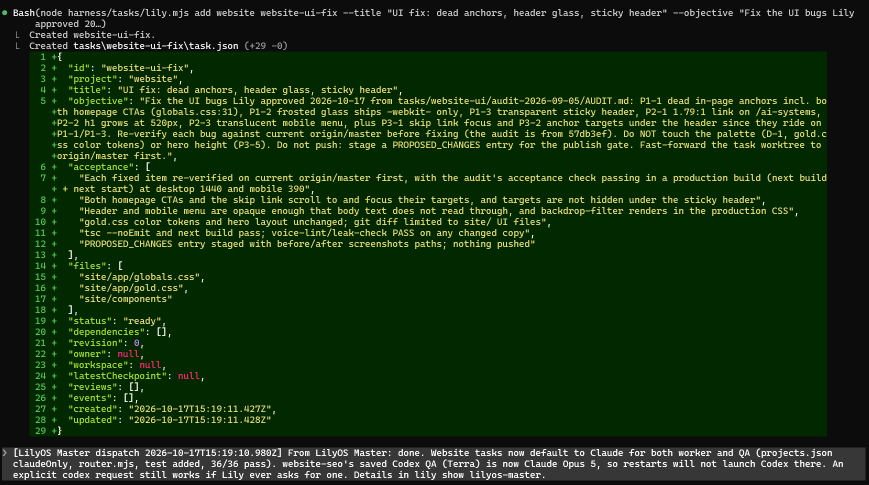
From there, this is how a task runs:
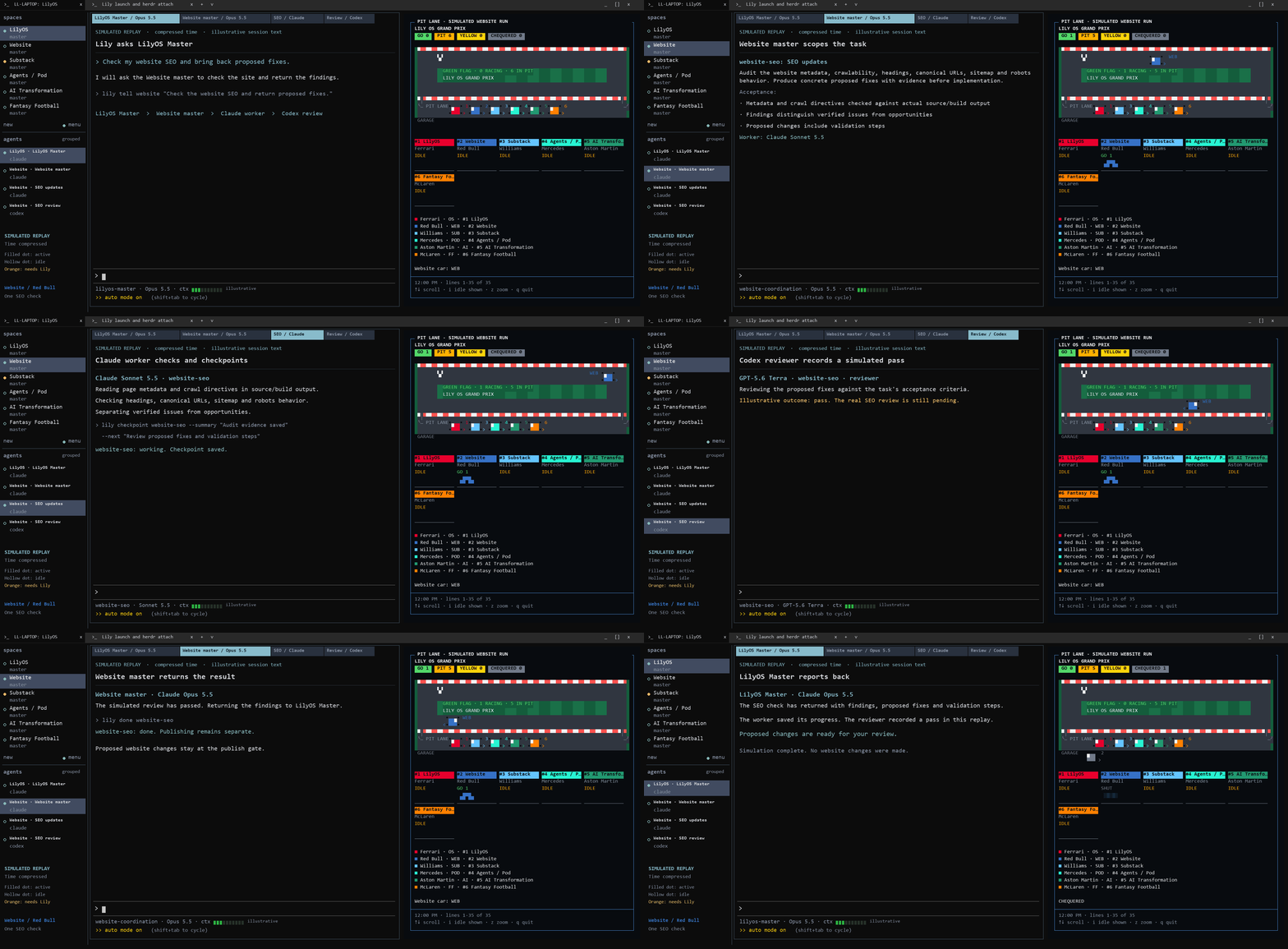
1. Routing. A script reads the task and picks the model (I use both Claude and ChatGPT models in my personal OS depending on the task), the effort level and the review plan. Coding and anything for an external audience get a reviewer from a different AI model. Those reviews catch problems the worker missed, which I get into more below.
2. Work. A worker session opens in its own terminal tab or pane, claims the task, and reads the project brief before it does anything.
3. Checkpoints. As it works, it saves checkpoints: what it did, what it checked, what’s next. If the session closes or its context fills up, the next session starts from the last checkpoint instead of from scratch.
4. Review. When it’s finished, it submits with evidence, and a review session opens on its own, on a different model. The reviewer checks the work against the three acceptance criteria and either passes it or sends it back with findings.
5. My signoff. The task shows up on my board as needing me. I read the proposed fixes and decide. Anything that would change the live site waits for my explicit yes before it deploys.
I’ll give another example that relates this process to a marketing ops task, like QA on a campaign email draft. The criteria would be that every link goes where it should, fields are included, with a fall back when a field is blank, the compliance footer and unsubscribe link are there, and the copy follows your voice rules. The same process:
A worker session checks the draft against each one and lists what it found.
A reviewer on a different model checks that list against the draft and sends it back if anything was missed.
Nothing gets approved until you’ve read the findings and said yes.
Here’s a simulation of how this actually works in my terminal setup. I also created a fun board view to visualize projects and tasks on the right-hand side, more on that below.
Why a terminal
I still use chat windows and log in to Claude and ChatGPT in my browser. But I use a terminal so I can completely customize my setup.
If you haven’t used one, a terminal is the text window on your computer where you type commands. Claude Code is Anthropic’s AI agent that runs in a terminal, where it can read and edit the files on your computer and run scripts.
If you use Claude on the web or desktop, a chat or Project works in a similar way, but it reads what you upload or connect to it, like files in a Project or a synced Google Drive. The comparison looks like this:
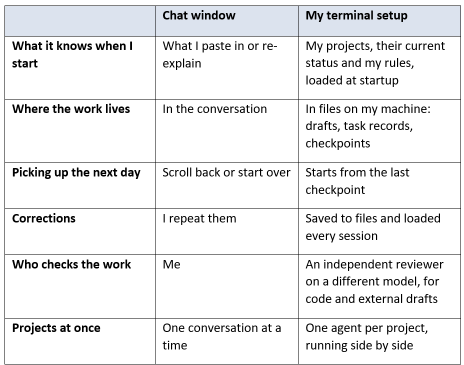
My OS is customized with scripts and automations, so it knows exactly what to pull, what projects I have and their current status, so I don’t have to explain each time. And I’ve set it up so it balances efficiency, autonomy, and quality. A chat window gets part of the way there with a Project and files you can attach. What I couldn’t do there was coordinate work across chats, have a second model review and QA the output, or run scripts and automations that carry across sessions.
With Herdr, the tool that manages my terminal tabs, and my terminal setup, I can talk to the master session that divvies out tasks, runs reviews, and coordinates with me.
One agent per project, each with its own memory
On my personal computer, I have projects registered in my LilyOS, from my website and this Substack to my agent pod and fantasy football. Each one has its own folder, its own brief and its own master agent. The Substack master picks up where it left off across restarts, from its own checkpoints.
My OS also applies rules from my corrections. For fantasy football, when I ask about a player on my bench, it has to argue that player’s case from multiple angles before it makes a recommendation, a rule that came from a start/sit call it got wrong.
Then there’s the most complex project, at work. That project grows every day, and there’s more and more context, so I have not only a Claude project but also a manifest file. I’m also actually developing code for this project. So it needs more setup to keep straight what work comes in, which skills the agents use, and how code gets reviewed. It’s almost its own OS at this point.
The setup works because it manages the context for a project with a lot of moving parts: who does what and how that gets into our project management tool, the code I write for the project and what that process looks like, regular meetings, and strategy docs. For any task, it knows where to get the information.
Keeping sessions clean to save costs
Usually I coordinate with LilyOS Master, but I also work directly with the project master sessions. The reason I’ve set things up this way is to keep context clean, to save on tokens and costs, and to preserve quality. A lot of the cost comes from one long session where the information isn’t accurate anymore and the LLM has to keep track of too many disparate workstreams.
Long sessions tend to get worse in quality and more expensive. Old information keeps getting included, and every new message sends the whole conversation back to the model. Normally most of the context is reused at a discount, which is called prompt caching. But after five minutes without a message (or an hour, on a longer setting), the next message is charged at full price (or more) for all of it.
Clearing sessions helps to fix both problems. A smaller, fresher session costs less on every message and much less when the cache expires, and the agent isn’t using old information. My OS flags when a session passes 150K tokens or is a day old, and starts up a task to hand off and spin up a new session exactly where it left off (I can choose to run this automatically or keep going). That’s brought costs down by a third.
My board and F1 pit lane
With a master session for every project, plus workers and reviewers opening their own tabs, I had so many panes open I had trouble knowing which ones needed my review, where we were at, and what needed to be done. I had Claude create a board for me to manage this. It runs in its own Herdr pane next to my agent sessions.
The left side is a list of what I need to do. Each item shows the project, what it is, how many days it’s been waiting and my next step. Under that is what’s running right now, a status line for each project, and a housekeeping line for idle panes and tasks that haven’t progressed in a while.
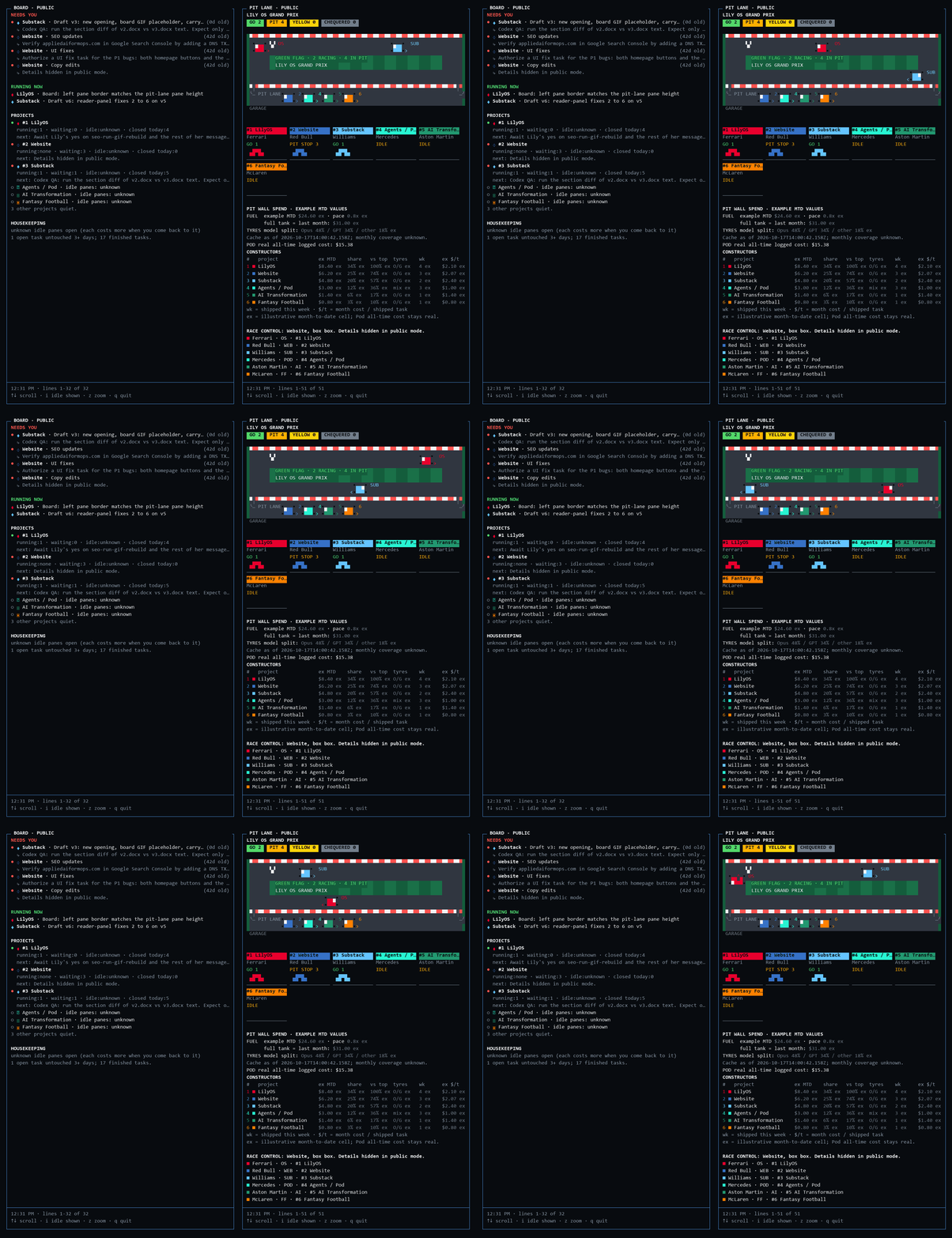
The right side is an F1 pit lane, something fun and visual I had Claude build alongside. Each project is a car with its own team: LilyOS is Ferrari (Lewis Hamilton is my favorite driver, big fan), my website is Red Bull, and this Substack is Williams. A car on track has an agent actively working on it. A car in the pit is waiting on its next step. A yellow flag means something is blocked, sitting in review, or the agent has gone idle. Across the top it counts how many cars are in each state, and a spend panel shows the cost breakdown.
I built the board the same way I do any task, like the SEO example. I described what I wanted to LilyOS Master in plain English, and it became a task with acceptance criteria: build it from my live task records, trace every number on screen to a file, and make no AI model calls, so leaving it open all day doesn’t add to my token spend.
A Codex worker (Codex is OpenAI’s coding agent) built the first version and submitted it about four minutes after it claimed the task. A Claude reviewer then ran the tests, checked the board against my live records and passed it about 14 minutes after that. I asked for icons, color and an actual running track with cars, which became its own task. This is how my agents work together to do the work I’ve asked for.
What I’ve learned
Context management is at the heart of what makes my OS work, and really hard to get right. A lot of my setup, like the handoffs, the checkpoints, project instruction files, and the token count on my status line, is there to keep each agent working from current information.
Automations also help make sure my rules get applied in a standard and systematic way, like the process that checks my website drafts against my voice rules, or the scripts that keep a task from counting as done before its review.
Maintaining this system is a lot of work, and it took several months of setup to get here.
But it’s paid off in many ways. I can manage multiple projects at the same time. I’m a lot more productive and can handle more tasks and projects. And I’m able to keep track of everything through my OS. And I haven’t had to sacrifice quality for it, either, with the QA and review process catching mistakes and issues. Just this weekend, my personal OS has run 38 tasks and 45 independent reviews, and 18 of those reviews sent the work back for legitimate changes.
It also needs regular upkeep, especially since the tools keep changing. Anthropic recently released mods for Claude Code, which change the Claude Code interface itself: panes, status lines, commands, and hooks (small scripts that run on their own at set moments, like when a session starts or ends). Part of the upkeep is learning what’s new and folding in the pieces that help. It’s been worth it for how much I learn.
Crawl, walk, run
If you want to learn how you can run something like this, here’s where you can start.
Crawl. Start with putting everything in files: who you are, your projects and their current status, your standards, and the corrections you keep making.
Walk. Use Claude to build automations, like scripts that run on their own when a session starts or ends. I also have routines on desktop that capture email, messages, and meeting context and insert it into my projects automatically, so I keep collecting context as I work with my agents.
Run. Once your context lives in files and stays current, give each project its own agent setup with its own memory and task records, and a coordinator that assigns the work, like the setup above.
For a more detailed explanation, check out my starter kits on my website that you can use. Just point your AI to it and ask it to help you implement.
Would love to know what you all are building and using to help with your daily work!
Beginner: The Files-First Starter Kit (lilyluo.ai/starter-kits/files-first). Works in the browser. Everything in files: who you are, current state, standards and corrections.
Intermediate: The Context Capture Starter Kit (lilyluo.ai/starter-kits/context-capture). Needs a desktop app or terminal. A startup step that loads your state, a routine that captures context into a project, a corrections loop, and prompts to clear stale context.
Expert: The Project Agents Starter Kit (lilyluo.ai/starter-kits/project-agents). Needs a platform you can configure. One agent per project with its own memory, task records, a coordinator, model routing, review scaled to the work, and a board.