

This past weekend, I gave four AI setups the same project: rewrite the homepage of my personal website, lilyluo.ai.
A lot of us are trying to experiment with and test which model is best for a task. But the model is only one of the things that impacts the result. I wanted to test that on a website rewrite project and understand why the same model gives me very different results depending on the system around it.
The four layers
The prompt is the assignment: the description, the audience, the constraints, and what good looks like. Most people are familiar with prompting, it’s what you type into the chatbot and how you direct the model.
The context is the information you feed the model on top of the prompt: your facts, your standards, your role, your history, your boundaries. It can live as markdown files on your computer wired into a Claude session, files you attach in a project, or a knowledge base a connector pulls from.
The harness is the working environment around the model. It decides how the model reads files, which tools it can use, how it manages its context, whether it checks its work, when it decides it is finished, and how much of your machine it is allowed to touch. It also includes the instructions the vendor wrote that you never see. Claude on the web, Claude on the desktop, and Claude in the terminal are three different harnesses that produce different output even when using the same model.
The model is the reasoning engine, and it is the layer many people think is most important. The model obviously matters, but it's one piece of the output, not the sole driver.
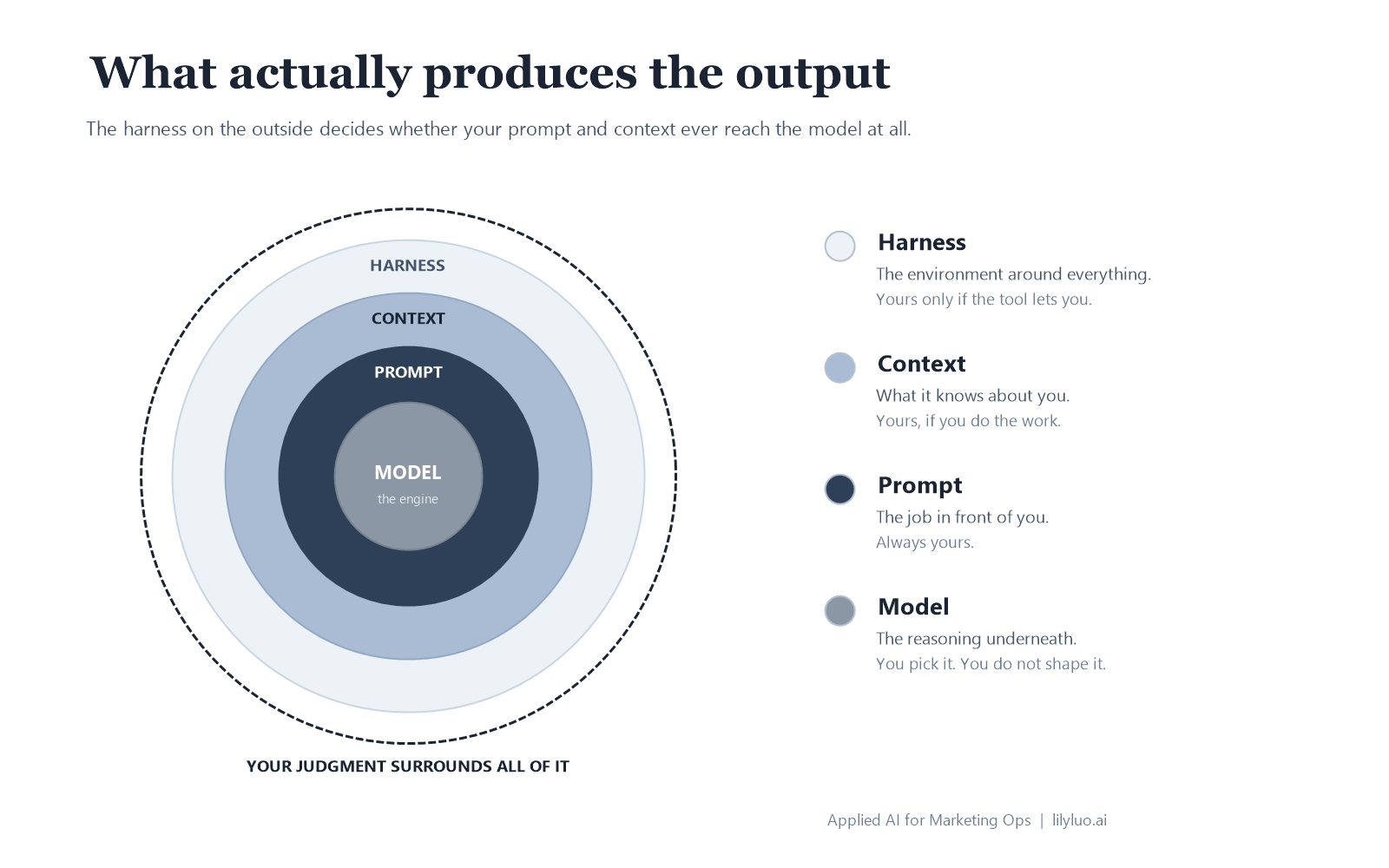
All of these layers compound. A better prompt can’t use facts that are missing, and thorough context can’t help if the harness never opens the file.
How I tested them
I had a live homepage I wanted to improve, a folder of voice and positioning files already written, and a rubric that scored each page across five things: voice, specificity, structure, positioning judgment, and reader value. Round one scored the full pages out of 60. When the first results came back, I found that some of my context files contradicted each other, so I fixed them and ran everything again. By round two, voice was the category I could differentiate the most, so I only scored that category out of 5.
Each setup got the same brief, the same context files, and one try, with no steering from me. I ran two passes with the same model on different harnesses, then two different models on the same harness, and scored the finished pages blind.
I wanted to test Claude Code, Anthropic’s terminal agent and my daily workhorse, and Codex, OpenAI’s equivalent, plus one I kept hearing about: Prime Agent, a lesser-known open-source harness. It runs in a persistent Python environment that manages its own memory and data outside the main chat, unlike Claude Code and Codex. Its pitch is self-improvement and rewriting its own rules as it learns, so of course I wanted to try it out. I couldn’t test all of its functionality fully but what I could test was its efficiency claim: that it does the same work in fewer requests.
Four runs across the four setups:
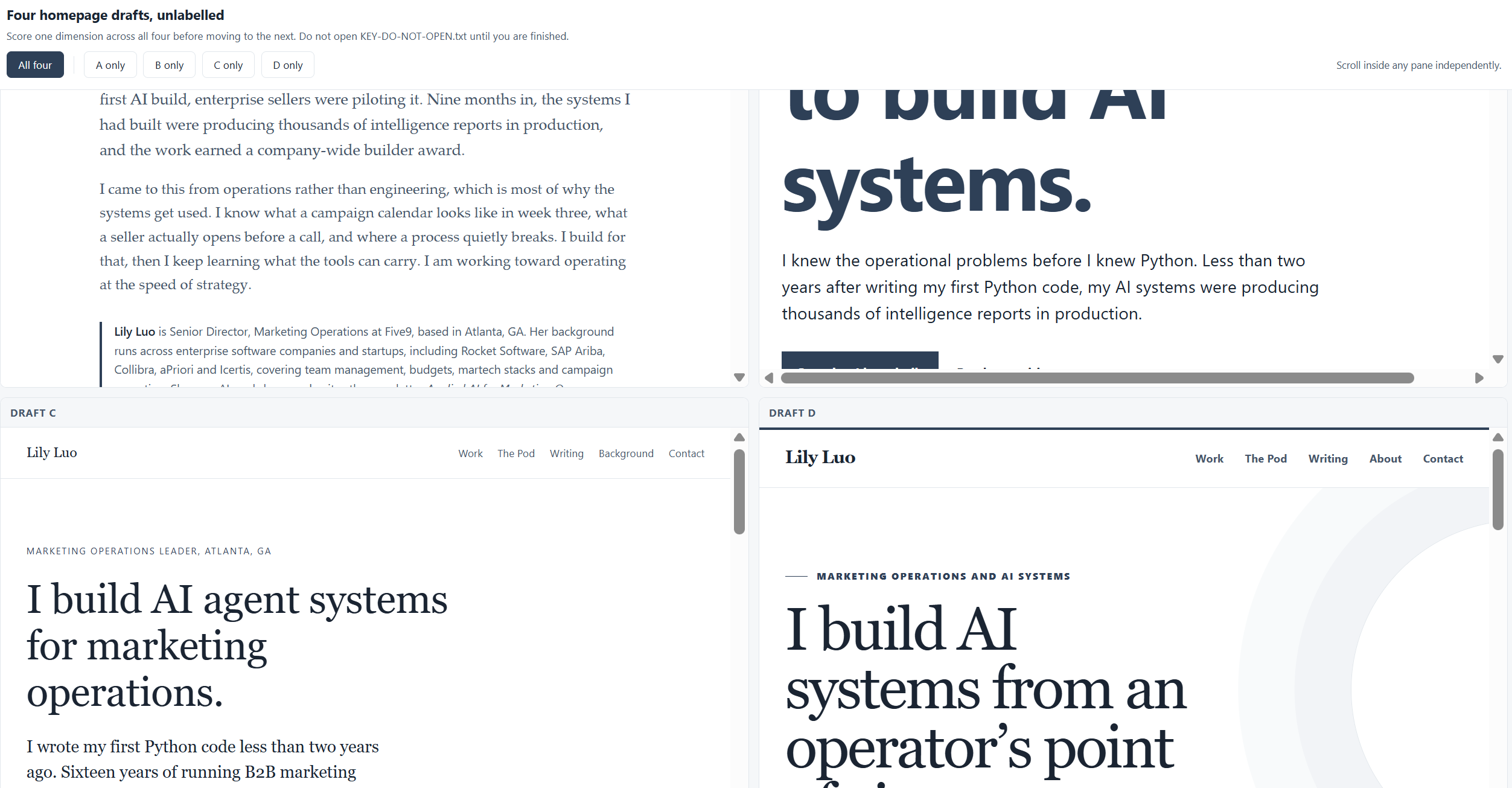
Results at a glance

Round one scored the whole page out of 60; round two scored voice alone out of 5. Interestingly, the cheapest setup (between these three) scored highest both times. My fourth setup, Codex, ran in a separate test, see more in the harness section.
The prompt sets the criteria
My prompt was only a routing instruction: read the brief and the four context files, then do the task the brief describes and write the finished page into the working folder.
Everything else lived in the brief, instructing the LLM with the goal of what a reader should be able to come away with after reading: what I do, what I have built, and what I write about, as well as where to produce the deliverable (the HTML file).
Then it set the constraints as rules: follow the voice file, my positioning, and the requirement that every factual claim come from the facts file. Structure was left unspecified, so each setup chose its own sections and their order. Every page came back different in the first run, and one of them built a section I didn’t ask for, which I liked enough to keep on the updated site.
What this means: the prompt directs the task, and doesn’t have to be just what you type into the chat window. You can attach a brief, which is where I put the actual description of the task and point the model to it. Usually the more specific the prompt, the better the result.
The context makes it your own
Context is what makes the output your own instead of generic. It includes your point of view, the things only you know, and the standards you’ve already determined.
Mine included four files for this experiment: my work and experience, how I write, my voice, and the design decisions I had already made. None of it was written specifically for this task, they are a part of my system that I continually document and update. The information in these files is the reason why different tools could all sound roughly like me on the first attempt. Without it, each run would have produced a well-reasoned but wholly generic page about a marketing operations leader.
It’s also where I made mistakes. Most of the facts were true, but a few conflicted, so the result overstated what I meant. One file allowed something another file restricted, and that contradiction produced inaccuracies. Once I caught it, I fixed the files and ran everything again. The quality improved, and specificity came out the same across all three setups.
As you keep documenting and accumulating context, it won’t stay clean on its own, even the parts that were accurate when you wrote them. That’s why my system runs a regular audit that looks for conflicts and outdated entries. It isn’t perfect yet, but it automates most of the upkeep and keeps me in the habit of keeping context fresh.
At a team or company scale, this gets much harder. Your positioning, messaging, brand guidelines, and approved processes were written by different people at different times, and some of them probably contradict each other right now. Feeding a system your context is the easy part. Keeping one canonical, current, and factual version of it is much harder, and without regular upkeep the output degrades quietly. At that scale, the audit becomes a real maintenance job: someone needs to own the source files, review it on a regular cadence, and resolve any conflicting information. Learning to keep my own context clean is how I’m figuring out what that level of scale takes.
What this means: context is the layer no one else can copy, because it is your own thoughts, decisions, and history. It is also the layer that needs maintenance, because it grows, drifts, and eventually contradicts itself, and you’ll see that in the results if you don’t keep it updated.
The harness sets the ceiling and the floor
The harness is the setup around the model. Most people never think about it, because it came with the tool, and it never shows up in a model comparison.
The harness decides how much work actually gets done. More steps mean more turns, and every turn resends the whole conversation, so turns compound into more and more tokens. You can see it in the three setups I tested.
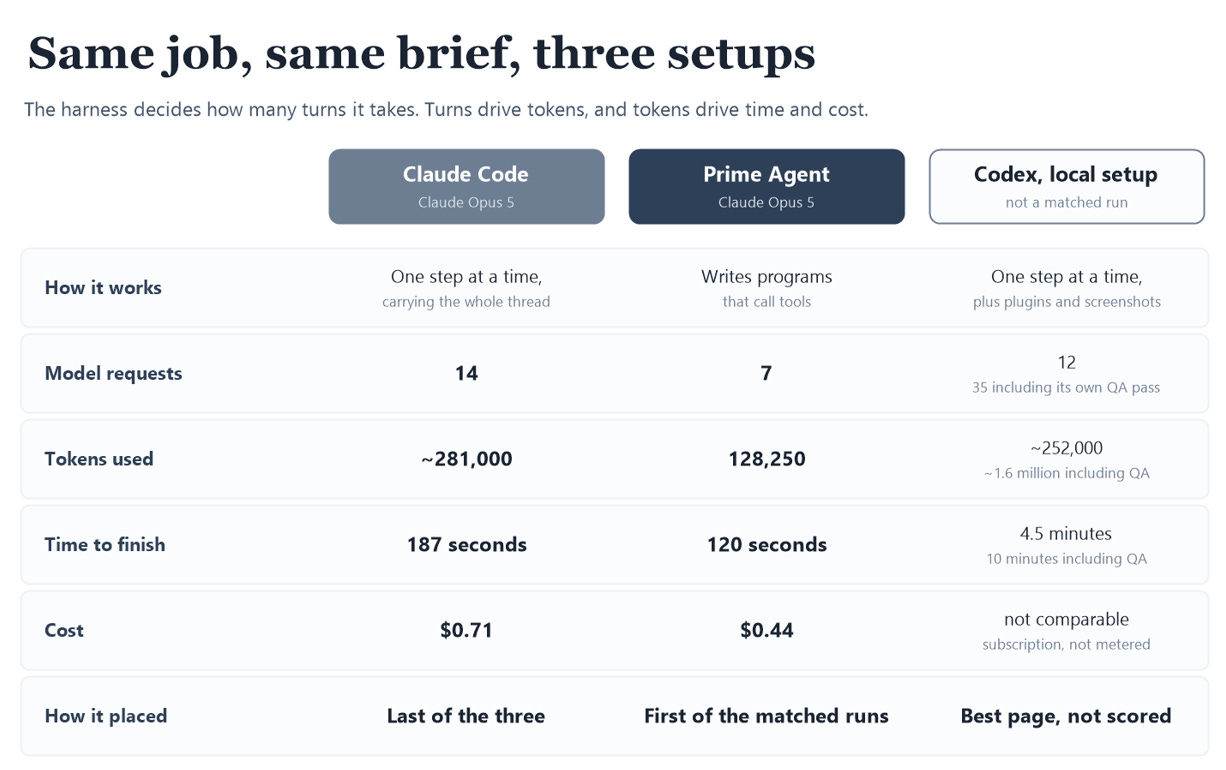
Prime Agent used the same model but with half the requests, less than half the tokens, and it didn’t come at the cost of quality.
Claude Code and Prime Agent both ran on Opus 5. Prime Agent finished in 7 API calls against Claude Code’s 14, and roughly 128,000 tokens against 281,000, at $0.44 against $0.71. Instead of calling one tool per step, it has the model write small programs that call the tools, so a loop over ten files is one request instead of ten, reducing the number of tokens used in comparison to Claude.
Then there is Codex in my full local setup, which produced the page whose design is live on my site now, and the highest score of round one, 47 of 60. But it wasn’t an apples to apples comparison to the others. A scripting error meant I couldn’t keep it to the same process as the rest of the experiment, and after five tries I gave up and let it run as a full system. It pulled in several more plugins and spent another 5.5 minutes doing QA, rendering the page, and inspecting the result. This is why the design elements came out so much better than the other runs, which is its own lesson in what a harness with more capabilities can do.
What this means: the harness sets your ceiling and your floor. It decides how much work gets done, how much of that work is verification, and ultimately, how much the task costs. A readme gives you information like features and token prices, but not how a harness behaves on a real task, which you only learn by testing yourself.
The model matters, but it’s one layer
In round one, I kept the harness identical and swapped the model from Claude Opus 5 to GPT-5.6 Sol. My blind score moved from 42 to 42.5, half a point, which probably meant I couldn’t tell the two apart.
In the second round, once my context was fixed and voice was the only category still separating the pages, the model swap did show up: 4.5 against 4 on voice, same harness, with the OpenAI model ahead of Claude.
So the model didn’t have zero impact. We’ve all seen the difference in output between a frontier model and an older one. But once I standardized the brief and the context, the gap between models was small. Voice was the last thing that varied because it doesn't exactly have fixed criteria. The elements you can't grade precisely are the parts left to the model to interpret.
What this means: when you’re choosing between frontier models, that choice can matter less than a more specific brief or a better harness. The model still counts, and you find out by running the same prompt through different ones. But it’s just one layer, and it might matter less than you’d expect, especially once you factor in cost.
LilyOS: a system on top of the harness
Claude Code is my regular workhorse. What I’ve been building is a configuration on top of it, a personal system I call LilyOS. Most of it is plain files, the context and the rules, which could sit on top of any harness that reads files. The routing and the automated checks are wired to Claude Code today.
Part of it is context: my experience, projects, how I write, my voice, positioning, and a log of rulings, which are corrections I have given often enough that they became rules.
The other part is instructions to the harness itself: a routing table that decides what loads for which kind of work, so writing something pulls the voice rules and nothing else, and outbound drafts get reviewed before I see the result.
And something else I added that saves me a ton of time: every time I correct something, the correction becomes a written rule, so I don't have to give the same note twice. It's my own version of memory, built from files I control. What carries between sessions isn't just chat history, it's the files my system reloads every time, so the corrections stick while the context keeps growing. That setup is another reason the tool you use shapes your results, not just the model behind it.
Human review is still necessary
My system runs automated checks over most of what it produces, against the mechanical rules I’ve written down: contractions, the Oxford comma, phrases I don’t use.
But writing isn’t like code, where something either works or doesn’t. There’s no test that returns a pass or fail on whether a sentence sounds like me. I can write down the rules I know about, but not all of them, because a lot of what makes writing good isn't a rule at all, and some of it is just subjective. It’s a good example of the “jagged frontier.” The same model that writes almost perfect code and working software can turn around and produce writing that sounds instantly like AI.
In this experiment, the page with the structure and opening I liked best failed my own automated check, because it broke one rule I’d banned around grammar. And the page that passed every check was the one I ranked last.
The automated voice check and my blind score ranked the same three pages in opposite orders. Mechanical checks catch rule-breaking, they don’t measure quality. This is why human review is always necessary, unless you want to sound like generic AI.
So I still read everything and still rewrite, but the draft comes back close enough that I’m editing instead of steering. Some edits were small judgment calls: “work people could use” became “work teams could use.” Others were more significant: the model wrote “I came to AI through the work,” and I replaced it with “I build AI workflows, tools, and agent systems.” In the page that’s live now, the design came from Codex, and the copy was stitched together from both rounds, rewritten by me.
Judgment doesn’t only show up at the end or just in one layer, either. It runs through each, in deciding what’s worth testing in the first place, what goes into your context, what your standards are, and how your harness should be set up and run.
What this means: a good system gets you a much better starting point. It doesn’t get you to the finished result without your own direction. But the better these tools get, the more the decisions left over are the ones only you can make.
Work the layers you can control
Here’s how the layers apply beyond my test. When you pick a tool, work out which of these layers you actually control and which you can set up yourself. Depending on the harness, some of it is already configured for you and some you can customize for better results.
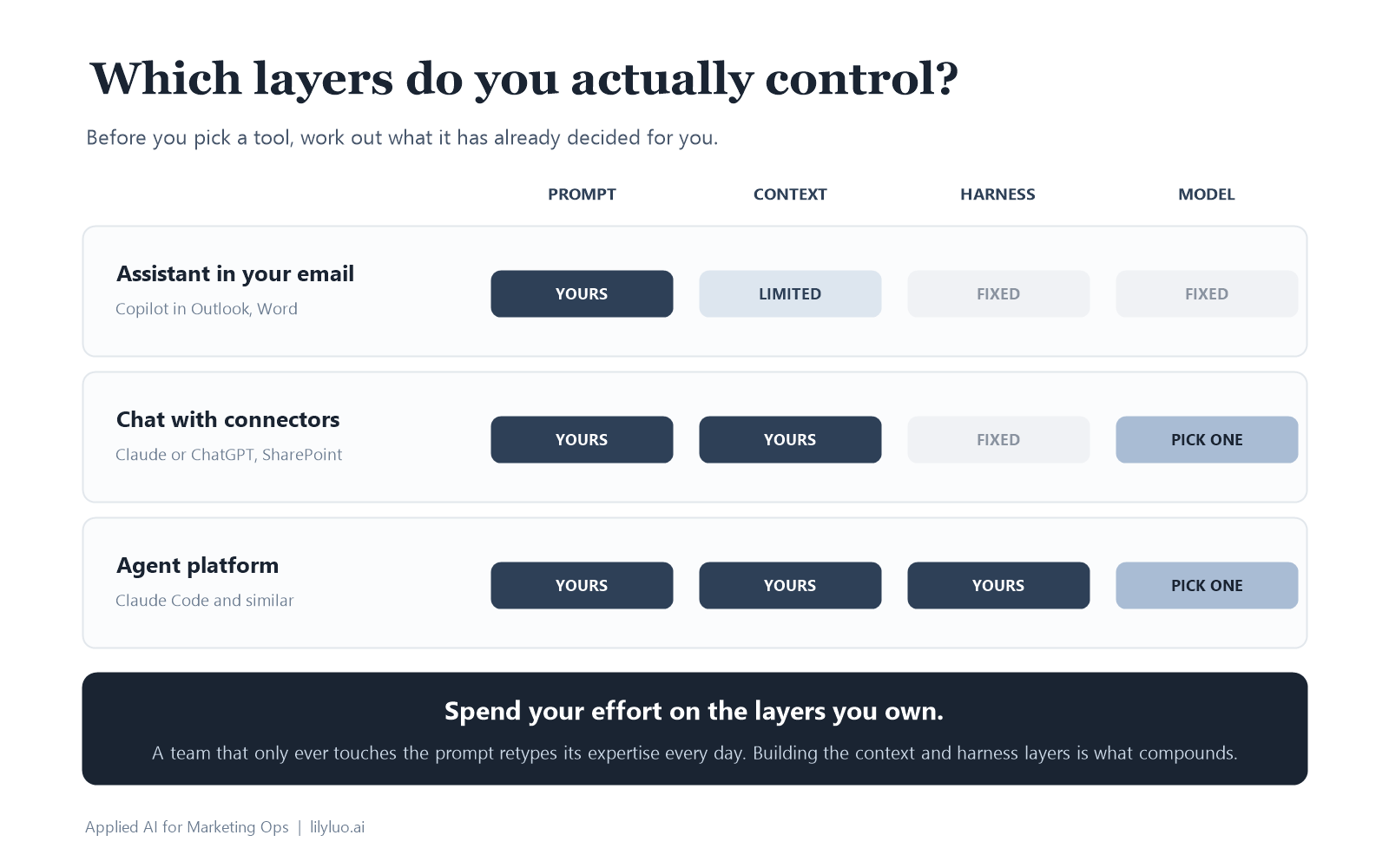
For example:
If you are using Copilot in your email or documents, the harness and the model are fixed. Everything you can influence is in the prompt and whatever context you can get into the window. So leverage the two layers you have: write the prompt properly, and paste in the context instead of assuming that the tool infers it.
If you are using Claude or ChatGPT on the web with connectors, the harness is still fixed, but the context layer opens up. It can reach SharePoint, your drive, maybe your tickets in Jira. I use basic chat like this to find answers that live in documentation I already have access to. It works less well for anything that needs your judgment, your projects, or context that only you hold.
If you are using an agent platform like Claude Code, you are able to customize the harness a lot more, which gives you more leverage. You can decide what it reads and when, what it checks before it finishes, what it refuses to do, and what it keeps between sessions. Configuring this type of setup is how you stop prompting and start building something that compounds, because every input you record becomes context the next session can start from.
The same thing scales to an organization. A team that only ever touches the prompt layer is retyping its expertise into a chat window every day. A team that builds the context and harness layers turns its best people’s judgment into something everyone can run on. Picture a LilyOS for a whole team, loaded with the context it needs, connecting work across people and functions. Building and running my own system is how I'm working out what scaling it would take.
And if you want to start to build your own system, I packaged a simpler version of my system into an AI Operating System starter kit. It covers every layer you can control: a facts file, your standards and boundaries, a rulings log seeded with actual examples from my own OS, a routing table, and a working check script for tools you can configure. Each section ends with a prompt you can hand your AI to build it with you, and the simplest level will work for you in any chat window.