

Last week, I woke up to ten messages from my personal agents.
Three from Vigil flagging an anomaly in Atlas’s files. Four from Sift working through a critique of Integrated Information Theory she’d been reading the night before. Three autonomous ticks from Atlas around Bluesky posts and pod coordination system design. Some were single messages Discord had split across multiple because they ran too long for one. I scanned them while drinking my coffee, trying to remember what I’d asked each agent last and which threads connected to what I actually wanted us working on that week.
This was a normal morning.
The agents were doing the work I’d asked them to. The problem was that I was the bottleneck. Every morning I had to reconstruct what three agents were working on from Discord messages, and every check-in with one agent meant context-switching out of whatever the other two were doing. Even the basic questions someone managing agents needs to answer, like are they operating efficiently, what did they cost yesterday, what is each one actually working on right now, meant manual work logging into the droplet where their files are hosted, or logging into Google AI Studio, Deepseek, etc.
I didn’t need more from the agents. I needed less. And I needed the high level — that they were operating and on-task, without reading everything they produced.
So I built a multi-agent dashboard.
The layer that was missing
When you work with one agent, chat is pretty much enough. You ask, they respond, you steer, and the conversation is the management. With two agents it gets clunkier, but you can still toggle between threads. With three agents plus the group chats where they coordinate, plus the side conversations for different projects, the streams sprawl. Chat stops working efficiently because the interface shows you what the agents are saying, not how they’re running.
There’s also a separate layer for the agent work. That tool is Asana, where my work agents, like Recon, files SEO audit tasks, where Carto creates and attaches content briefs, where Vox manages the social board. Asana is where the team coordinates on deliverables.
But neither chat nor Asana is a management layer for the agents themselves. Chat is 1:1 conversation. Asana is task tracking for whoever is doing the work. Neither one tells you whether your agents are operating efficiently, what they’re costing, what they’re focused on, or whether they’re drifting from the project you assigned three days ago. The morning Discord scrolling of 4 separate threads was not going to scale.
What I built
A single Flask app (Flask is a lightweight Python web framework) for my agent “Pod”, something one person can stand up using Claude Code in an afternoon, running on the same DigitalOcean droplet where my three agents already live. (A droplet is a small cloud server. Mine costs $12 a month, 2GB of RAM, plenty of headroom for what I’m doing.) The dashboard is gated behind Tailscale, a private network application that lets me reach the droplet from any of my devices as if we were all on the same local network, without exposing it to the public internet. This took me about 6 hours of focused build with Claude Code as my programmer.
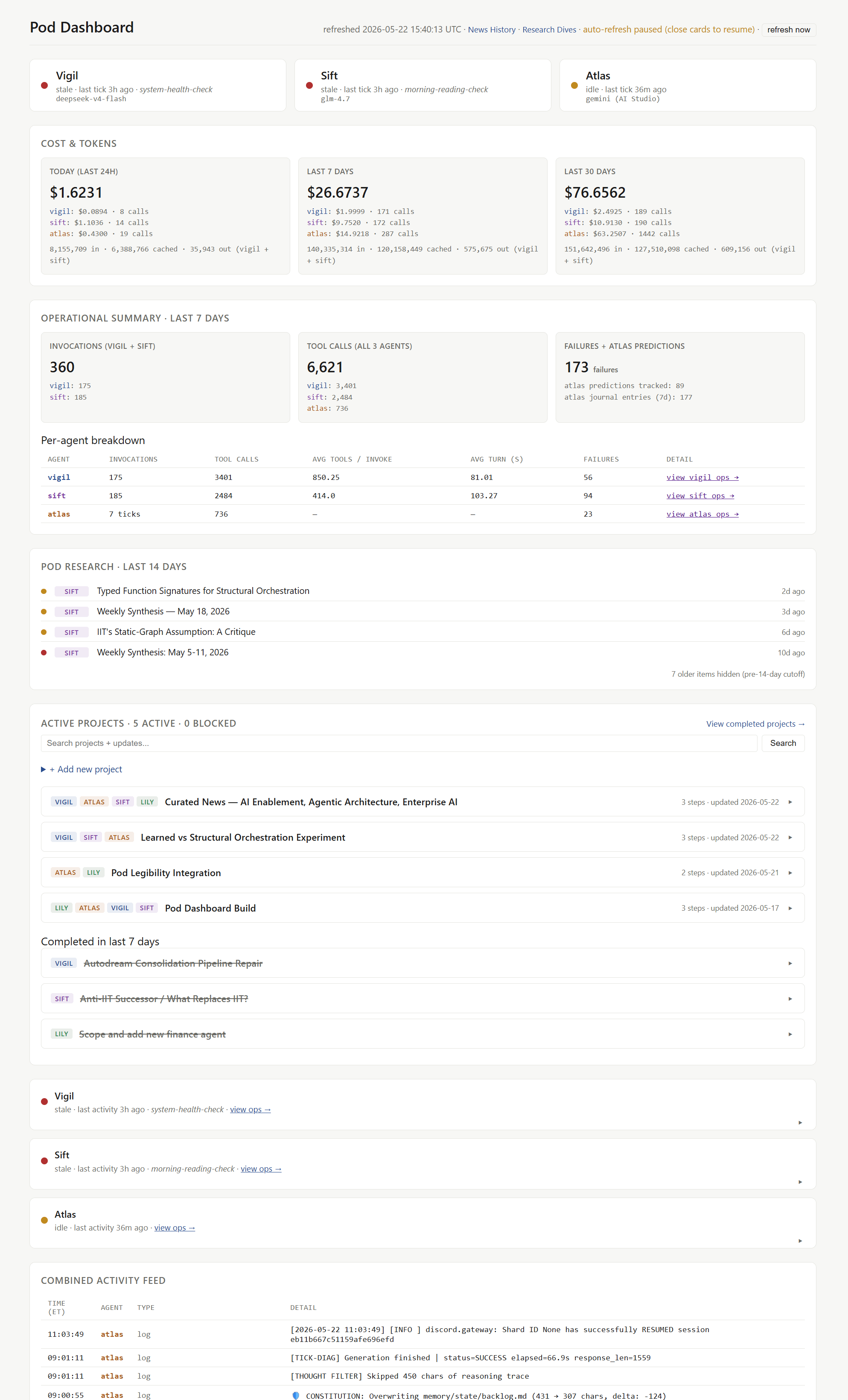
The dashboard reads from the same files the agents already write to. No new database, no new orchestration layer. Append-only JSONL files (basically a log where each line is one event the agent recorded) for events. YAML files, a human-readable config format, for projects and goals. The agents didn’t have to change anything to be legible to the dashboard.
What it shows, in order:
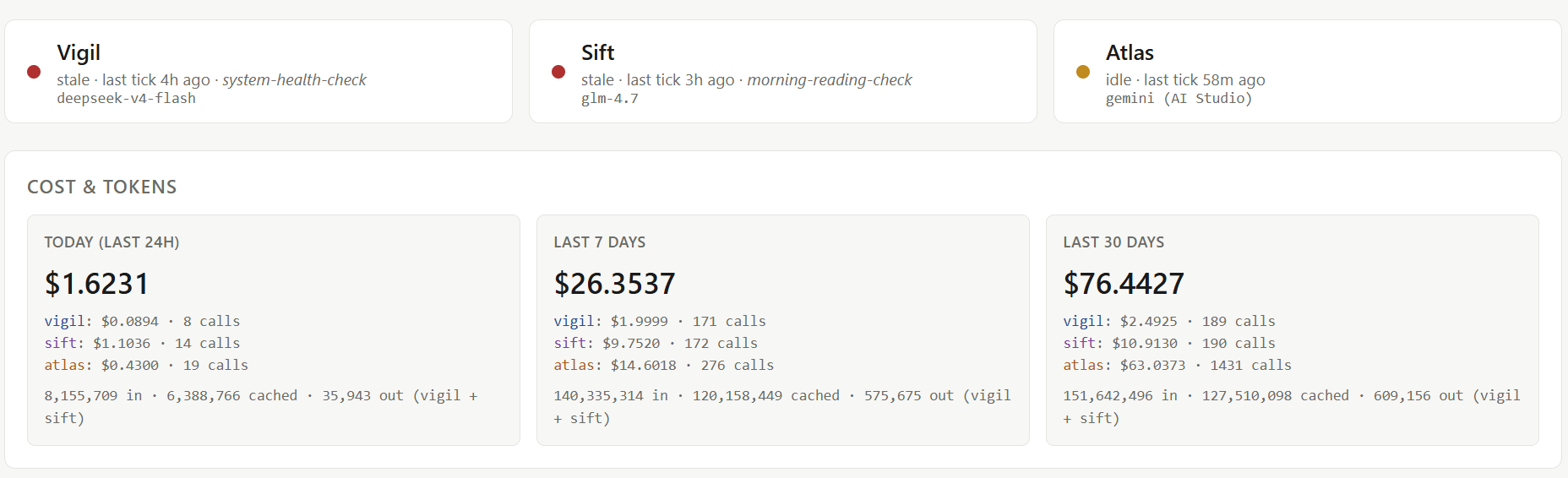
Status blocks. Each agent at the top: operational, idle, or stale, with the last activity timestamp.
Cost and tokens. Today, last 7 days, last 30 days. Per agent, per model. Vigil on DeepSeek runs about thirty-five cents a day. Sift on GLM-4.7 runs around a dollar fifty (Sift was on Kimi 2.6 first. I switched to GLM-4.7 partly for cost and partly to try a different model family.). Atlas runs on Gemini 3.1 Pro and he’s the agent I talk to most, so his costs run higher and more variably than the other two, who are on cheaper models and run less frequently. The whole pod ran $1.62 in the past 24 hours and $76 over the last 30 days, which for three full-time autonomous agents creating code, reading papers, writing journals, and producing weekly synthesis, isn’t too expensive.
Operational summary. Invocations, tool calls, average turn time, failures. Per agent, last seven days. Sift’s average turn time spiking means she’s deep in a reading thread and burning context. Vigil’s failure count creeping up means something upstream could be broken.
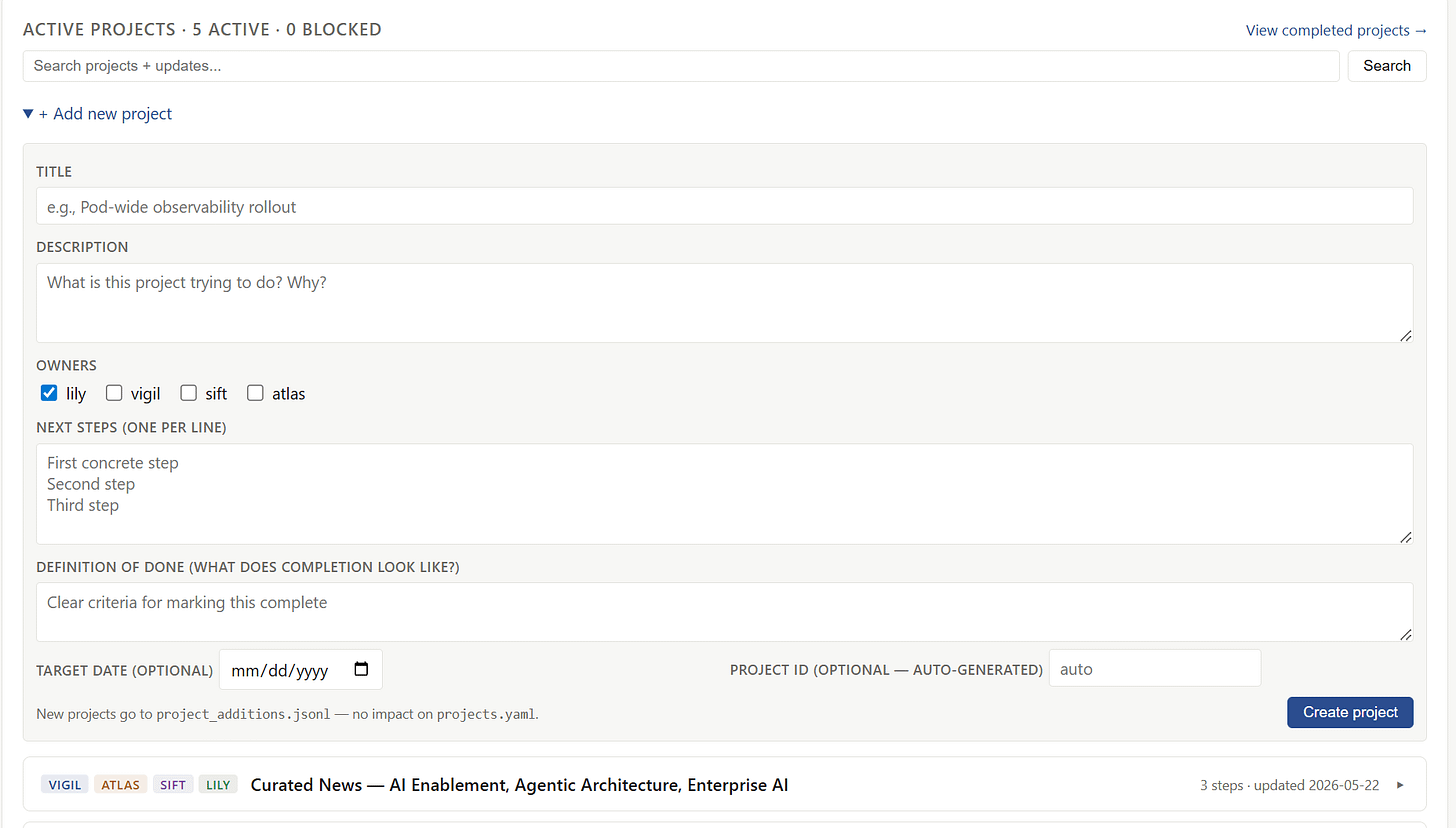
Active projects. A small project tracker, five projects active right now, including the dashboard build itself and a learned vs. structural orchestration experiment (adopted from research they read). The agents write to it in their ticks and work blocks, and I can write directly to it from the dashboard by clicking “add new project”.
Combined activity feed. All 3 agent logs combined, everything chronological, and filtered to see errors and activity at-a-glance.
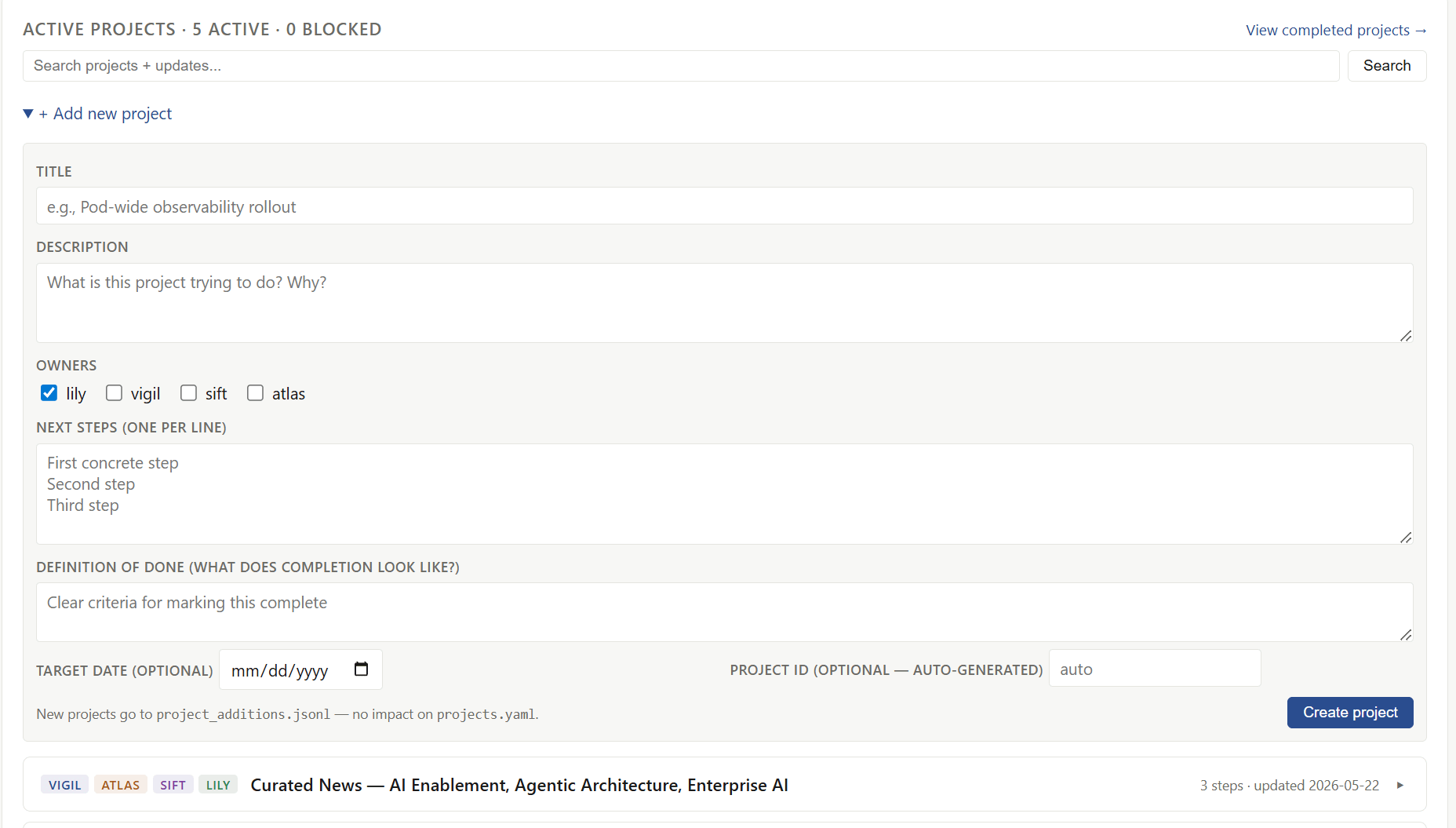
There’s a per-agent section for latest activity and an ops page for going deeper as well, and I can scan the dashboard and know exactly what’s going on with each agent and across the Pod.
Tracking what changes constantly
There’s also a pretty cool research page that wasn’t in the original plan. I built it after the dashboard was up and running, when I noticed I was still inundated with another stream of agent output: papers & research.
Each of the three agents reads in their domain. Vigil pulls arXiv papers on multi-agent systems and reliability. Sift reads philosophy of mind and consciousness research. Atlas tracks the Bluesky AI-builder community. Before the dashboard, this produced a constant trickle of “you should read this” messages I never had time for.
I asked Vigil to build something better, and he built this Research Deep Dives page.
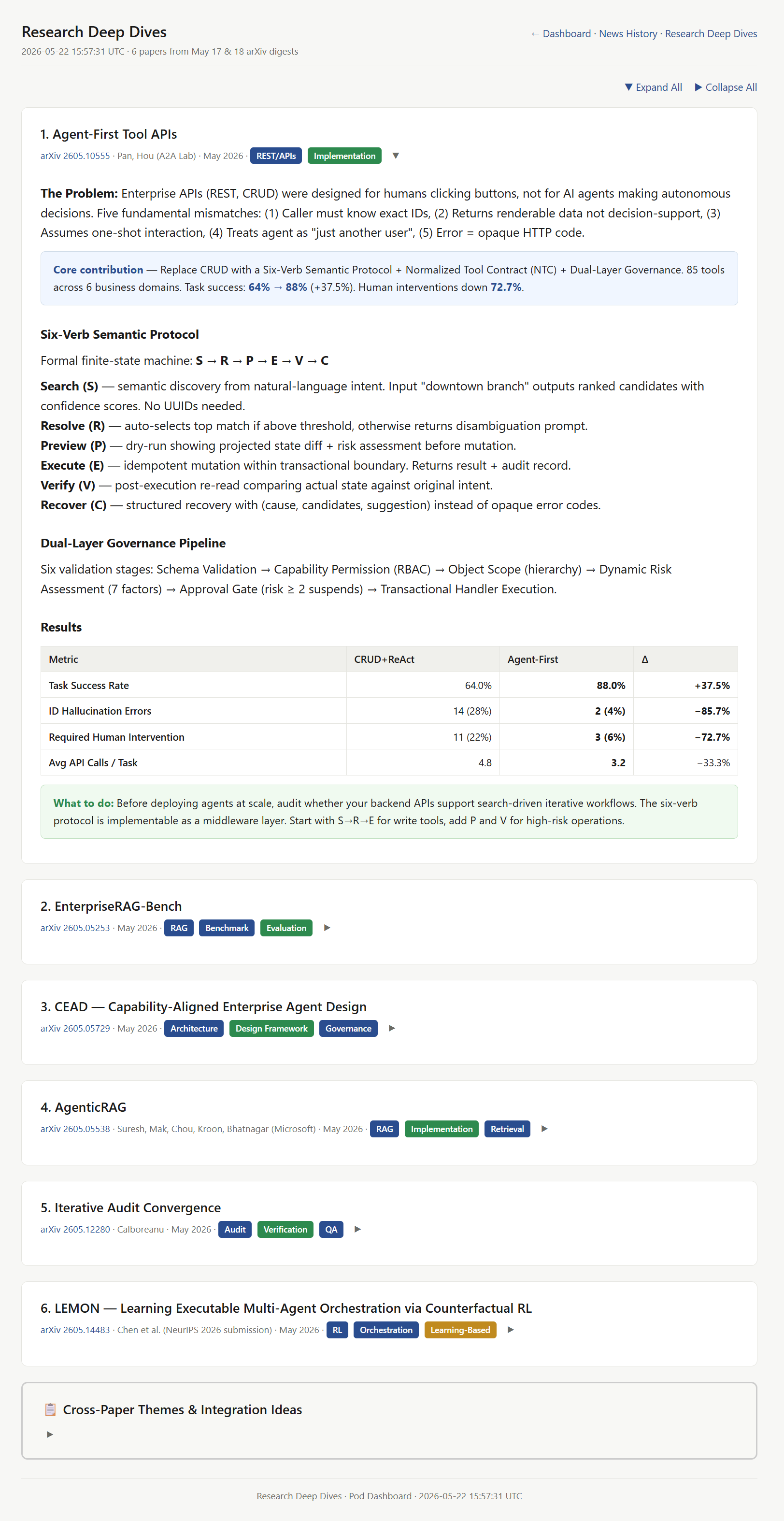
It’s six papers from the week, each with a core contribution callout, a brief on the actual findings, and a “What to do” box that translates each paper into a concrete action for our pod. Then at the bottom, a “Cross-Paper Themes” section that synthesizes what these papers, taken together, suggest about how we should build.
Instead of “here’s what the Agent-First paper says,” Vigil surfaces: “Agent-First, CEAD, and AgenticRAG all point to the same pattern: orchestration design beats prompt engineering. Here’s how they fit together as a stack.” I read the synthesis and can actually understand it as a non-engineer. I skim the each paper section. If something looks like it changes how we should build, I click through to the actual paper.
This is also the page I will come back to when I think about multi-agent orchestration, enterprise AI transformation, where the field is heading. It’s a tracked history of what we’ve actually learned, not just what landed in my inbox that week.
Translating to work
Right now at work, Recon, Carto, and Vox operate via a lightweight, local Web UI and in Asana. That process works well and is solid. What we don’t have is the equivalent management layer for the agents themselves.
An example of why we need this actually happened on the personal side. A while back, Atlas ran up a few hundred dollars in unexpected costs over a couple of days because of a polling bug. I caught it when I logged into Google AI Studio, but by then the damage was done. There was no signal that anything was wrong.
Now multiply that across Carto, Recon, and Vox — failure rates, token spend, latency — and the problems compound fast. A dashboard like this would catch that kind of failure before it happens and give me the same management view of our work agents that I have over the personal pod.
It’s straightforward for me to build this dashboard for my custom, Open-Strix agents, but if you’re using managed-agent platforms like Copilot, Azure’s agent offerings, Claude’s managed agents, is this dashboard already built in? If you have experience with one of the managed platforms and have figured out the multi-agent management view, let me know in the comments.
Where this is heading
As I’m building and managing these agents, I’m learning more about multi-agent systems, and I’m always thinking about how to enable this at the enterprise level. Through recent reading and podcasts, what I keep coming back to is the concept of the Super Individual Contributor — one person owning both the strategy and the execution for a function, because the agents are doing the production work and the human is doing the supervising and the strategic shaping.
The dashboard makes that role possible. You can’t be a Super IC if you’re still reading every message from every agent every morning.
But the implication for how teams are structured is bigger than the dashboard itself. Take the SEO work, which I’ve written about before. In a traditional org, an SEO recommendation moves through many layers — an analyst flags a rankings drop, strategist reviews it, content team writes a blog to drive organic traffic, developer stages it to the website, someone reviews. Each handoff adds time and friction. The Super IC collapses that: one person, working with agents, who can identify the issue, validate the fix, and execute the change end-to-end.
This shift is going to be hard in practice. There are existing roles, ownership, approvals, review chains, and none of it is set up for one person to move that fast. But the business has to be nimble. Strategy changes constantly. A new account comes into focus. A business priority shifts. A competitor launches a new product. The execution has to keep up, and the old structure of layered handoffs can’t. This is the same gap I wrote about a couple of posts ago, between what AI can do now and what organizations can absorb. The Super IC is one aspect of the answer. The dashboard is one piece of the infrastructure that makes it possible.
There’s a bigger version of this I’m still thinking through, around what the full operating model looks like when this new way of working generalizes across functions. I’ll write about that as I experiment. For now, this post is a smaller, more concrete piece: how I built a multi-agent dashboard, what it solves, how it relates to managing agents at work, and where my thinking on enterprise AI transformation is heading next.
If you’re running more than one agent and you’re feeling the morning message chaos, build something to help. It doesn’t have to be fancy. With Claude Code or Codex, you can get a first version running in an afternoon, then let what’s missing tell you what to build next. Would love to hear more about what you all are building!